
WEBINAR
Chicken or Egg 2:
AI proposes, the planner decides
From production plan to schedule – live, step by step
In our first session, we argued that decisions and process should come before the system. This time, we put the system to work. Watch a live walkthrough of BiModalOne Planning & Scheduling: from a 16-week master production plan to a shift-level schedule ready for the shop floor.
The webinar was held in Polish.
Full recording · 57 min · available after sign-up
Less slides, more screen
What happens to your production plan when a paint booth goes down and a customer calls with an urgent order on the same day?
Most manufacturers can build a plan. The hard part is understanding what a change does to it, and deciding what to do next before the plan ends up back in Excel.
In this session, Artur Bula and Oskar Skrzyniarz walk through a demo based on Demomet, a fictional manufacturer of steel enclosures with a five-step process: cutting and bending, welding, painting, assembly, and quality control. Mid-term plan and short-term schedule are calculated on the same items, BOMs and routings. Only the time bucket changes.
You will see an unconstrained, MRP-style run, then the same demand planned against real capacity limits using optimization, with a clear boundary between mid-term planning and short-term scheduling. Then the plan is tested with a production disruption and an unplanned customer order.
The session ends with a first look at an LLM-based planner assistant and a clear principle: algorithms calculate, AI assists, and the planner makes the decision.
01 · BOM
Unconstrained master production plan for finished goods only or across all BOM levels, with load per work center.
02 · CAPACITY
Constrained mid-term planning with optimization and a “wall” separating mid-term planning from short-term scheduling.
03 · GANTT
Short-term schedule in Gantt, table and histogram views, with warnings and the current bottleneck identified.
04 · DISRUPTION
A paint booth shutdown recalculated live, showing exactly how many orders are delayed as a result.
05 · RUSH ORDER
A rush customer order inserted at the earliest feasible date without disturbing frozen orders.
06 · AI ASSISTANT
Plan versions stored and compared, and a first look at the LLM assistant for planners.
FROM THE SESSION
A look inside the live demo
Part 2 of the series: live, not on slides
The first session asked whether process or system comes first. Part 2 shows BiModalOne Planning & Scheduling in action: from demand, through a constrained plan, to a schedule the shop floor can execute, presented by Artur Bula and Oskar Skrzyniarz.
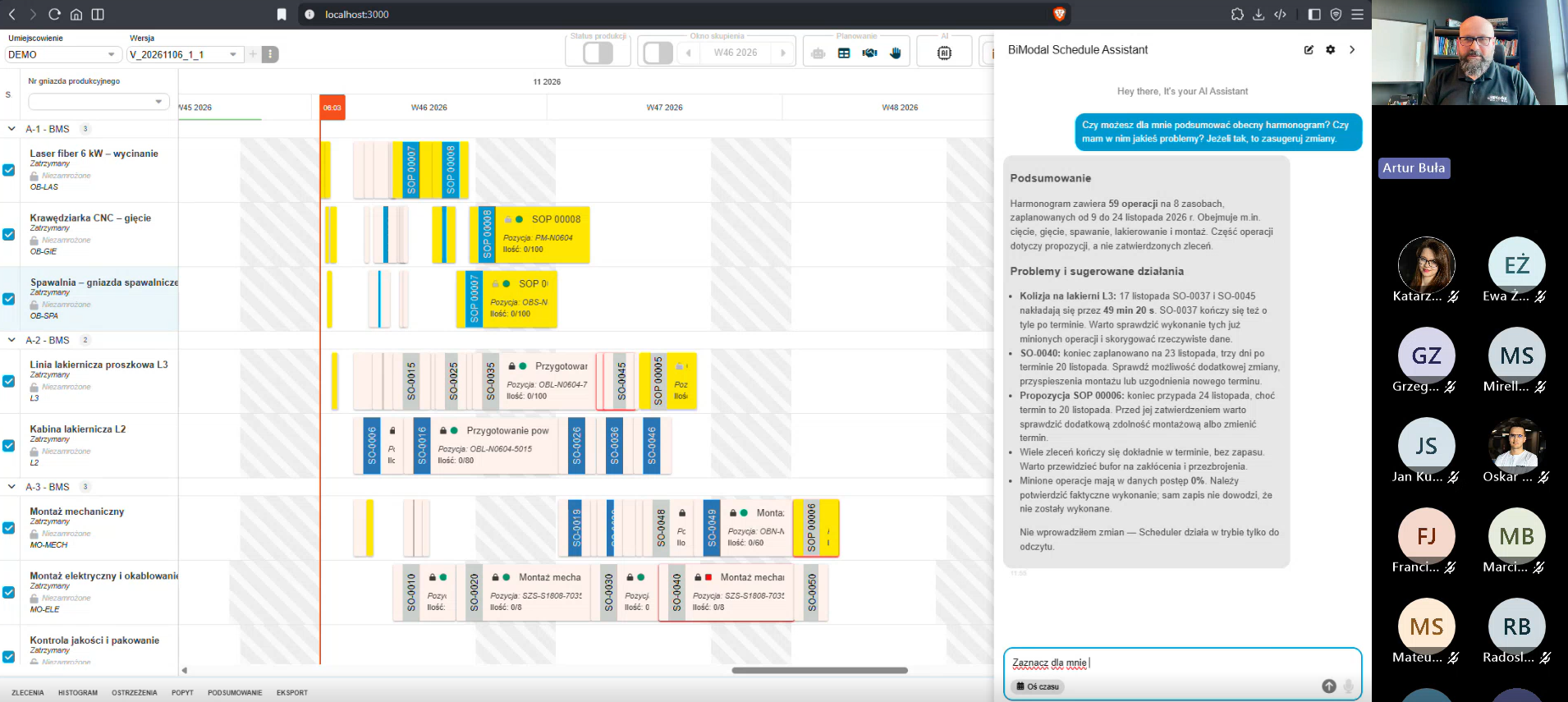
The schedule, and an assistant that reads it
A shift-level Gantt for Demomet across cutting, bending, welding, painting and assembly. Next to it, the BiModal Schedule Assistant is asked to summarize the schedule: it counts 59 operations on 8 resources, flags an overlap on paint line L3, points out orders finishing after their due date, and suggests what the planner should check next.
“No changes were made – the Scheduler works in read-only mode.”
The assistant proposes. The planner decides.
A brief word about
the presenters:

Artur Bula
CEO, BiModal Solutions
Founder of BiModal Solutions and a Supply Chain Management expert with 25 years of experience in the digital transformation of Polish and international manufacturing companies. He champions low-code platforms and a bimodal approach to implementation, developing BiModal’s own solutions for supply chain planning and production execution.

Oskar Skrzyniarz
Planning Platform Developer, BiModal Solutions
For three years at BiModal Solutions, Oskar has been building tools that make planners’ everyday work easier. He combines metaheuristic algorithms with intuitive planning interfaces, because he believes a tool’s ergonomics matter as much as the process behind it.

Want to see it on your own data?
We are preparing a hands-on workshop on mid- and short-term planning and on data needed to get started. Leave your details and we’ll invite you to the next session.
Sign up!